Application Commands
Till now, The traditional way of using bots was text commands where bots would listen to messages and if it starts with certain prefix then they will parse the commands and arguments and generate the desired output.
With addition of interactions based application commands, This has significantly changed. Application commands aim to provide user-friendly interface to interact with the bot.
Getting Started
Diskord provides an easy to use and Pythonic interface to register and work with application commands.
Unlike text commands, Application commands are compatible in both diskord.ext.commands.Bot and diskord.Client as they are part of Discord API.
To use application commands, You must add your bot to the server with application.commands scope.
It’s simple, You just have to generate an OAuth URL with bot and application.commands scope and invite the bot.

The helpers for creating application commands are implemented in diskord.application
namespace.
Creating Basic Slash Command
Let’s have a quick example of an application command.
Example:
import diskord
from diskord.ext import commands

bot = commands.Bot(command_prefix='$', application_command_guild_ids=[guild_id])

@bot.slash_command()
async def hello(ctx):
  await ctx.respond('Hello from slash command!')

bot.run('token')
Replace guild_id with the ID of server you are creating command in.
Note
We added a guild ID here because global application commands take up to 2 hours to be registered in
Discord. For testing purposes, you can pass in application_commands_guild_ids parameter with the
list of IDs of guilds that you want to register command in. Guilds commands registration is instant.
You can remove this parameter once you want to register global commands.
Now we have created a basic slash command:


It can be used by typing / in chat and selecting hello from commands
selection menu.
User Commands
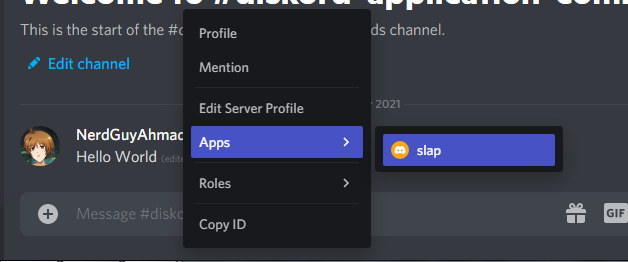
User commands can be invoked by right-clicking on a user in Discord in a server and selecting the command from “Apps” menu!
Example:
@bot.user_command()
async def slap(ctx, user):
  await ctx.respond(f'{ctx.author.name} slapped {user.name}')
Message Commands
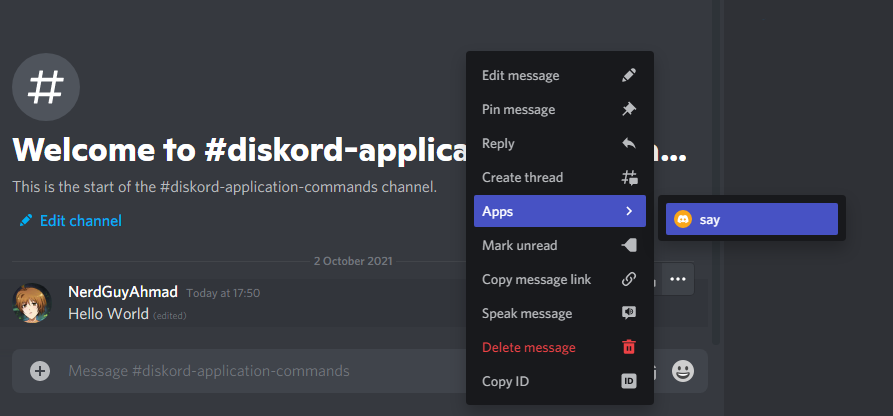
Message commands can be invoked by right-clicking on a message in Discord in a server and selecting the command from “Apps” menu!
Example:
@bot.message_command()
async def say(ctx, message):
  await ctx.respond(f'{ctx.author.name} said: {message.content}')
Now it’s time to go a little deep in application commands. Specifically, Slash commands.
Arguments Handling
Just like the traditional commands system, Slash commands also support arguments handling and Diskord provides a pythonic way of handling slash command options.
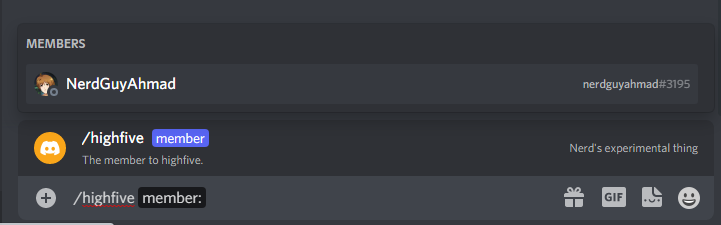
Slash commands options are registered using option() decorator.
Example:
@bot.slash_command()
@diskord.application.option('member', description='The member to highfive.')
async def highfive(ctx, member: diskord.Member):
  await ctx.respond(f'{ctx.author.name} highfived {member.name}!')

Option Types & Requirement setting
Options support a wide range of types like users, channels, roles, integers, booleans etc. Options can also be marked required or optional. Here’s how
Types of options are determined by the annotation of the argument that represents them in command function.
Options can be set optional by setting a default value to them!
For example:
@bot.slash_command()
@diskord.application.option('item', description='The item to purchase.')
@diskord.application.option('quantity', description='The quantity of item.')
async def buy(ctx, item: str, quantity: int = 1):
  await ctx.respond(f'You bought {quantity} {item}!')
In above example, the quantity option is set as an integer and only integer can be passed to it and it is optional because we set the default value to 1, Not providing this option would default it’s value to 1.

Available types are as follows, You can annotate your options with these types to get different results:
str: Stringint: Integerfloat: Numberbool: Boolean i.e True or Falsediskord.Userordiskord.Member: A discord user.diskord.abc.GuildChannel: Any type of guild channel.diskord.TextChannel: A text channel in a guild.diskord.VoiceChannel: A voice channel in a guild.diskord.CategoryChannel: A channels category in a guild.diskord.StoreChannel: A store channel in a guild.diskord.StageChannel: A stage voice channel in a guild.diskord.Thread: A thread within a text channel in a guild.diskord.Role: A role in a guild.typing.Union[
diskord.Role,diskord.User]: Any mentionable i.e role or user.
Note
typing.Union can be used on channel types to filter channel types. For example:
Union[diskord.VoiceChannel, diskord.TextChannel] would only show voice channels and text channels.
Option Choices
Certain choices can be added to an option for user to choose from:
For example:
@bot.slash_command()
@diskord.application.option('item', description='The item to purchase.', choices=[
  diskord.OptionChoice(name='Cookie', value='cookie'),
  diskord.OptionChoice(name='Candy', value='candy'),
  diskord.OptionChoice(name='Cake', value='cake')
])
@diskord.application.option('quantity', description='The quantity of item.')
async def buy(ctx, item: str, quantity: int = 1):
  await ctx.respond(f'You bought {quantity} {item}(s)!')

Here, name is the name of choice that would be shown in Discord and value is the value of choice that it holds. The value would be passed to command function.
Option Autocompletion
A great thing about option choices is that you can easily generate custom autocompletions as the user types in the value. This library provides an interface for dealing with this too.
Example:
async def autocomplete_items(value, option, interaction):
  items = {
    'Bun': 'bun',
    'Cookie': 'cookie',
    'Cake': 'cake',
    'Ice cream': 'icecream',
    'Pizza': 'pizza',
  }
  return [
    diskord.OptionChoice(name=name, value=items[name])
    for name in items if name.lower().startswith(value.lower())
  ]

@bot.slash_command()
@diskord.application.option('item', autocomplete=autocomplete_items)
async def buy(ctx, item):
  await ctx.send(f"You bought {item}")
Slash Subcommands and Command Groups
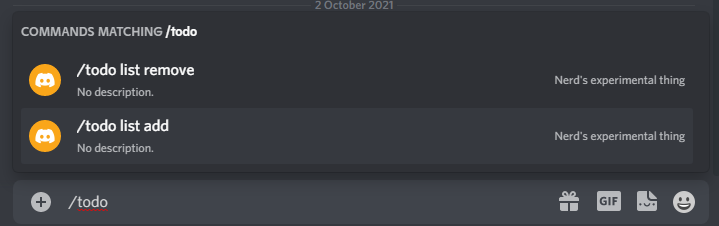
You can nest subcommands in a slash command or make a subcommand group in a slash command which has further subcommands!
The flow of creating these is pretty similar to ext.commands!
Example:
@bot.slash_command()
async def git(ctx):
  pass

@git.sub_command()
@diskord.application.option('remote')
@diskord.application.option('branch')
async def push(ctx, remote: str = 'origin', branch: str = 'master'):
  await ctx.respond(f'Pushed to {remote}/{branch}!')

Furthermore, you can also nest in subcommand groups that can hold subcommands.
Example:
@bot.slash_command()
async def todo(ctx):
  pass

@todo.sub_command_group(name='list')
async def list_(ctx):
  pass

@list_.sub_command()
async def add(ctx):
  await ctx.respond('Added a todo.')

@list_.sub_command()
async def remove(ctx):
  await ctx.respond('removed a todo.')
Checks
Note
Checks and converters are currently partially implemented for application commands and are missing some functionality which is currently under development.
You can use checks that are ran before command invocation and if they return False, Command invocation is aborted. This is a useful way of restricting commands to users with specific permissions, Restricting commands to DMs only etc.
The checks for application commands are directly derived from ext_commands, Please refer to the manual of ext.commands for more info.
Example:
@bot.slash_command()
@commands.has_permissions(manage_messages=True)
@diskord.application.option('message', description='The message to echo!')
async def echo(ctx, message: str):
  await ctx.respond('\'+message)
Above command will only be ran if the user has “MANAGE MESSAGES” permissions in the guild.
Custom Checks
You can also create custom checks!
Example:
def is_me():
  def predicate(ctx):
    return ctx.author.id == 1234 # put your ID here.

  return commands.check(predicate)

@bot.slash_command()
@is_me()
async def secret_command(ctx):
  await ctx.respond('This is secret command!')
Handling Check Errors
Unlike normal commands, The errors of application commands are passed to on_application_command_error()
Example:
@bot.event
async def on_application_command_error(ctx, error):
  if isinstance(error, commands.MissingPermissions):
    await ctx.respond('Cannot run the command before you do not have required permissions.')
  else:
    raise error
Note
Text commands and application commands are different in design so there is no way to use same error handler for both systems.
Converters
Note
Checks and converters are currently partially implemented for application commands and are missing some functionality which is currently under development.
You can use converters with options of slash commands to run some custom conversion on option value and then pass it to the function.
The converters for application commands are directly derived from ext_commands, Please refer to the manual of Converter for more info.
This can be helpful in certain use-cases.
Example:
class BooleanConverter(commands.Converter):
  async def convert(self, ctx, argument):
    argument = argument.lower()
    if argument in ('yes', '1', 'true', 'enable', 'on'):
      return True
    if argument in ('no', '0', 'false', 'disable', 'off'):
      return False
    else:
      raise ValueError(f'Unknown value "{argument}" was passed.')

@bot.slash_command()
@diskord.application.option('mode'):
async def toggle(ctx, mode: BooleanConverter):
  await ctx.respond(f'The value is set to: {mode}')

@bot.event
async def on_application_command_error(ctx, error):
  if isinstance(error, diskord.ApplicationCommandConversionError):
    await ctx.respond(str(error.original))
This was it for this quick overview, There’s a lot more that you can find in the documentation!